✓ Fast Shipping · 30-Day Returns · Secure Checkout· Buyer Protection
Skip to product information
1 of 8

LL+TRADER

LL TRADER Screen Replacement for iPhone 11 LCD Retina 6.1'' FHD Display COF Touch Screen Digitizer with Repair Tool Kits, Waterproof Tape, Screen Protector(for Model A2111, A2223, A2221)

LL TRADER Screen Replacement for iPhone 11 LCD Retina 6.1'' FHD Display COF Touch Screen Digitizer with Repair Tool Kits, Waterproof Tape, Screen Protector(for Model A2111, A2223, A2221)

Regular price $23.97 USD
Regular price Sale price $23.97 USD
Sale Sold out
Shipping calculated at checkout.
Quantity
  • Secure Checkout
  • Easy Return
  • Shipping 3-5 Days

About This

  • [Description]: This is an excellent replacement for your broken, faulty, cracked or dead pixeled touch screen! This product will be professionally quality tested after production, and will only be shipped if it passes the test. Since this product is fragile, it may be damaged during fulfillment. If you receive a damaged product, please feel free to contact us and we will give you a solution.
  • [Compatibility]: iPhone 11 LCD (NOT OLED ), model number: A2111, A2223, A2221.Please confirm your iPhone model before purchase. (Check your iPhone model at the following steps: Settings--General--About--Model Name).If you found out the screen is not compatible with your phone,please contact us.
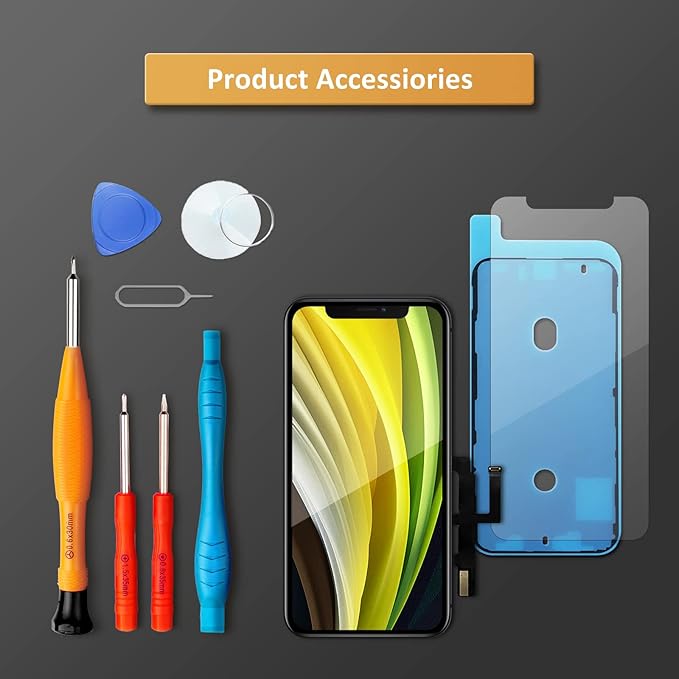
  • [Easy for installation]: This unit includes the iPhone 11 LCD (NOT OLED ), 6.1 inch LCD Display, Glass Digitizer and required Tools for DIY. To avoid any unnecessary damage,You can search "Replace iPhone 11 LCD Screen Replacement" on YouTube or google for a video instruction of how to do the replacement. You aslo can contact us to get more information about screen replacement.
  • [Note]: If the screen does not work properly,(for example:touch problems, green or white lines appearing on the screen, the screen turning black, or other problems), please check the cables inside the phone and make sure they are all properly connected. If you encounter any problems during installation, please contact us and the Professional 24-hour after-sale service team will help you.
  • [Guide]: Remove the two screws at the bottom edge. Use the triangular pick to open the iphone. Don't insert pick over 3 mm, and don't insert your pick in left edge, as may damage internal components. Remove the screw securing the display connector bracket and disconnect the front sensor cable. Connect the new screen cable and please carefully align and press down on one side until it clicks into place. Do not press down on the middle. If the connector is misaligned, causing permanent damage.

Customer Reviews

★★★★★ Sarah M.

"Excellent product! The fingerprint recognition is incredibly fast and accurate. Installation was straightforward and the build quality feels premium. Highly recommend!"

★★★★★ James T.

"Great security upgrade for my home. The keyless entry feature is super convenient, and the battery life is impressive. Worth every penny."

★★★★★ Emily R.

"Love this smart lock! The app integration works flawlessly and I can monitor access from anywhere. Customer support was also very helpful."

★★★★★ David K.

"Perfect replacement for my old lock. The fingerprint sensor is reliable and the backup keypad is a nice touch. Definitely recommend to anyone looking for a smart lock."

View full details