MOKiN USB-C Docking Station, Dual HDMI
Couldn't load pickup availability
Quick Answer
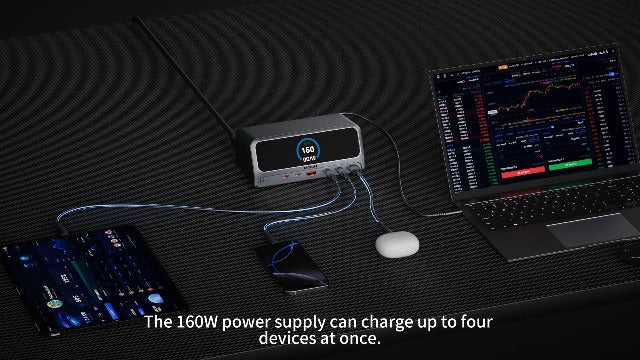
The MOKiN USB-C docking station adds display and peripheral connections to a compatible laptop. The listing describes a 13-in-1 dock with two HDMI ports, a 2.26-inch LCD smart display, and built-in 160W power information.
Who Is It Best For?
It is best for laptop users building a desk setup with multiple displays and who want a visible way to check connection status and power-delivery information.
Key Benefits
- Combines laptop expansion and display connections in one dock.
- Two HDMI ports are listed for a dual-monitor setup.
- A 2.26-inch LCD displays listed connection and power information.
- A physical button is described for managing data and video transmission.
- 13-in-1 design helps reduce the number of separate adapters on a desk.
Key Features
- 13-in-1 USB-C docking station
- Two HDMI outputs
- 2.26-inch LCD smart display
- Built-in 160W power specification in the listing
- Physical control button
- USB-C laptop connection
How to Use
- Connect the dock to a compatible laptop USB-C port.
- Connect one or two displays to the HDMI ports as needed.
- Attach supported USB devices and other peripherals to the dock.
- Use the LCD to view the displayed connection or power information.
- Use the physical button only when you need to manage data or video transmission.
What’s Included
Check the package contents, power accessories, and cable requirements against the product listing before setup.
FAQ
How many ports does it have?
The product listing describes a 13-in-1 docking station.
Does it support two monitors?
Two HDMI ports are listed. Actual dual-monitor support depends on the laptop, operating system, and display configuration.
What does the LCD show?
The listing says the 2.26-inch LCD shows connection status and power-delivery wattage.
What is the listed power specification?
The title lists built-in 160W power. Confirm the applicable output and charging requirements for your devices before use.
Will it work with every USB-C laptop?
Compatibility depends on the laptop’s USB-C data, video, and power capabilities. Check those requirements before purchase.
Share

Journals
View all-
Best Monitor & Laptop Stands 2026: Ergonomic Pi...
Upgrade your workspace with the best monitor and laptop stands of 2026. From height-adjustable telescopic risers to 2-tier wooden organizers, these ergonomic picks reduce neck strain and maximize desk space.
Best Monitor & Laptop Stands 2026: Ergonomic Pi...
Upgrade your workspace with the best monitor and laptop stands of 2026. From height-adjustable telescopic risers to 2-tier wooden organizers, these ergonomic picks reduce neck strain and maximize desk space.
-
Best Portable Power Banks 2026: Fast Charging P...
Never run out of battery again. Discover the best portable power banks of 2026 — slim 10000mAh models with built-in cables, 22.5W fast charging, and USB-C compatibility for iPhone, Android,...
Best Portable Power Banks 2026: Fast Charging P...
Never run out of battery again. Discover the best portable power banks of 2026 — slim 10000mAh models with built-in cables, 22.5W fast charging, and USB-C compatibility for iPhone, Android,...
-
Best Security Cameras 2026: Top Indoor & Outdoo...
Keep your home safe with the best security cameras of 2026. From 2K indoor WiFi cameras to weatherproof outdoor systems with AI detection, we've rounded up the top picks for...
Best Security Cameras 2026: Top Indoor & Outdoo...
Keep your home safe with the best security cameras of 2026. From 2K indoor WiFi cameras to weatherproof outdoor systems with AI detection, we've rounded up the top picks for...